Portable Monitor For Laptop Explained: A UK Buyer's Guide
Portable Monitor for Steam Deck UK: The One-Cable Guide
Portable monitor for Steam Deck UK: drive the Deck over one USB-C cable into the Coolhood 15.6-inch Full HD panel and power it from the mains.
Yes — the Steam Deck drives an external screen over its single USB-C port using DisplayPort Alt Mode, so a full-featured USB-C portable monitor like the Coolhood 15.6-inch Full HD panel gives you a far bigger picture from one cable. Feed the monitor’s power-in port from a charger and the Deck keeps playing off the mains.
We are Coolhood, and we make one thing: a 15.6-inch Full HD portable USB-C monitor. So take this as evidence, not sales patter — including where a battery-equipped or high-refresh rival will suit your Deck better than ours.
Why add a portable monitor to a Steam Deck?
The Deck’s built-in screen is lovely for a handheld: 1280×800 on a 7-inch LCD at up to 60Hz, or a 7.4-inch HDR OLED at up to 90Hz on the newer model. It is also small once you are at a desk or on the sofa. A 15.6-inch, 1920×1080 panel roughly doubles the diagonal and lifts the vertical pixels from 800 to 1080, so menus, maps and text stop feeling cramped.
Valve rates the Deck’s USB-C output at up to 8K/60Hz or 4K/120Hz, but that is a ceiling for the port, not a promise from the chip. The Deck’s APU runs at just 4–15W, so it is happiest feeding a 1080p/60Hz screen rather than chasing 4K. A Full HD portable monitor is a sensible match — big enough to matter, light enough for the bag.
Be candid, though: the OLED Deck’s own 90Hz HDR panel has richer contrast than any 60Hz IPS travel screen, ours included. You are trading refresh rate and inky blacks for size, sharper text and a shared workspace.
The single-cable question: video and power over USB-C
Here is the bit people get wrong. The Steam Deck has only one USB-C port, and it carries both the video signal (DisplayPort Alt Mode) and, potentially, power. Run a single USB-C cable from the Deck to a full-featured USB-C monitor and you will get a picture — but if the monitor draws its power from the Deck, you are now running a 15.6-inch screen off a handheld battery, and it drains quickly.
That is why a second USB-C port matters. The Coolhood has two: a lower full-featured USB-C port for display and power, and an upper USB-C power-in port. The tidy setup is to plug a USB-C charger into the power-in port so the monitor runs off the mains, then connect the Deck to the display port. The screen no longer leans on the Deck’s battery.
The trickier promise is true passthrough — the monitor charging the Deck back down the same link. Many “USB-C compatible” monitors only power themselves and pass little or nothing back, so the console still slowly discharges under load. The Deck accepts a maximum of 45W over USB-C PD 3.0, so a 45W charger (the Deck’s own works well) is the right feed. How much actually reaches the Deck from our panel is a measured number, not a marketing one — and until that measurement is published, plan around the charger’s rating with margin rather than an assumed passthrough figure.
One more note: the Coolhood’s Mini HDMI input is for HDMI sources such as a docked Switch, PS5 or Xbox. The Steam Deck outputs over USB-C, so USB-C is your cable here.
A quick setup that works
- Plug a 45W USB-C charger into the monitor’s upper (power-in) port.
- Connect the Deck’s USB-C port to the monitor’s lower full-featured USB-C port.
- The Deck should switch to the external display; set it to 1920×1080 at 60Hz in Settings.
- For sound, use USB-C audio or the Deck’s 3.5mm jack — our built-in speakers are a little tinny, so headphones are better for a session.
How it stacks up against rivals
Plenty of portable screens pair with a Deck, and some beat us on specifics. The ASUS ZenScreen MB16AH is a similar 15.6-inch Full HD panel with USB-C and micro-HDMI. If you want smoother motion or genuinely cable-free play, the ASUS ROG Strix XG16AHPE runs at 144Hz with a built-in battery — better for untethered, high-refresh play, though it costs and weighs more. Budget names such as EVICIV cover the basics at 60Hz. Most of these, ours included, sit at 1080p 60Hz, so the choice comes down to battery, refresh, price and after-sales support.
| Spec | Steam Deck (OLED) | Coolhood 15.6-inch |
|---|---|---|
| Screen size | 7.4-inch | 15.6-inch |
| Resolution | 1280×800 | 1920×1080 |
| Refresh rate | up to 90Hz | 60Hz |
| Panel | HDR OLED | IPS, HDR, rated 300 nits |
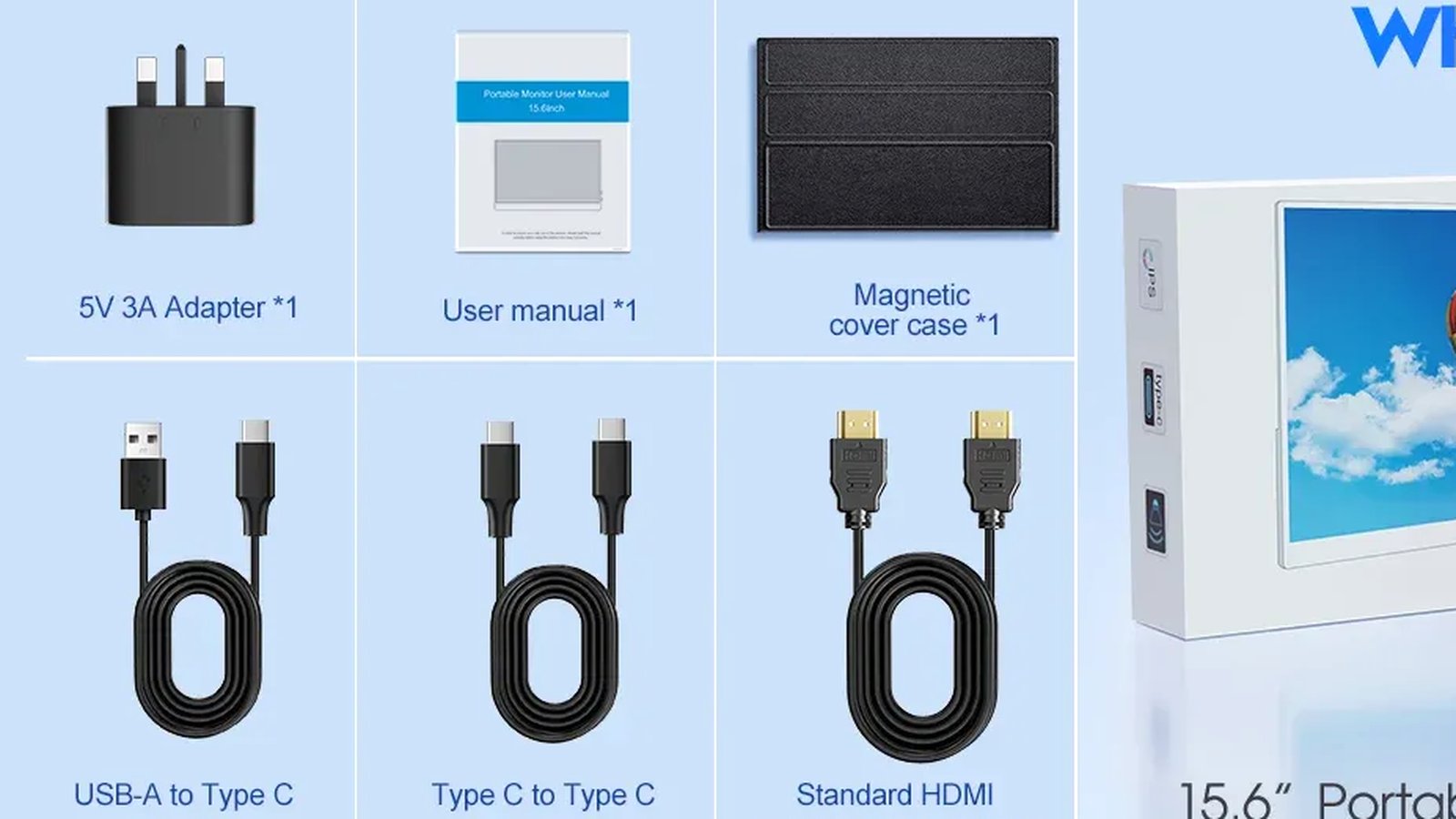
The Coolhood 15.6-inch Full HD portable monitor is an aluminium-chassis panel at 750 g, with a magnetic PU-leather smart cover that folds into an adjustable stand, HDR, a side toggle wheel for brightness and volume, and both USB-C and Mini HDMI. It is £115.51 with free UK delivery, a 2-year UK warranty, UK support and 30-day returns — the UK-supported option rather than a grey-import gamble.
Gaming on other handhelds? The same one-cable thinking applies in our guide to a portable monitor for the ROG Ally in the UK, and for a docked console our portable monitor for the Nintendo Switch covers the HDMI route instead.
Frequently asked questions
Can the Steam Deck run a portable monitor with just one cable? Yes. The Deck sends video over USB-C using DisplayPort Alt Mode, so one cable to a full-featured USB-C monitor shows the picture. To avoid draining the Deck, add a charger to the monitor’s own power-in port so the screen runs off the mains.
Will the monitor charge my Steam Deck while I play? The Coolhood has a dedicated power-in port, so it powers itself rather than leeching from the Deck. Whether it also passes charge back to the Deck depends on wattage; the Deck tops out at 45W over USB-C, and the figure our panel returns is listed above as a factory test rather than a guess.
What resolution and refresh rate will I get? 1920×1080 at 60Hz. That is a clear step up in size and sharpness from the Deck’s 1280×800, and well within what the Deck’s GPU can drive for most games.
Is 60Hz enough for the Steam Deck? For most Deck titles, which often run around 30–60fps, yes. If you want 120Hz or 144Hz for fast shooters, choose a gaming-focused portable instead.
Ready to transform your workspace with Coolhood?
Shop Now — £115.51